


Bebi: Baby Games for 2-4y kids
4.619.92K Reviews
App Specs
- Version
- 10.09.73
- Updated On
- License
- Free
- Downloads
- 10,000,000+
- Developer
- Bebi Family: preschool learning games for kids
- Categories
- Educational
- Platform
- Android
Screenshots


 Analysis by AppCompare
What I find most useful about Bebi is the way it brings several kinds of early-learning play into one place. For a toddler, that can make the difference between a screen session that feels like aimless tapping and one with a simple focus: notice a shape, try a puzzle, or explore colors. I would treat it as a handy activity to share or offer for a short stretch, not as a substitute for talking, drawing, building, or playing together away from a screen.
A small choice can make play easier
When a young child is restless, choosing between a few familiar activities is often easier than being handed a completely open-ended device. Bebi gives children a collection of games to explore, including puzzles and coloring activities, so I’d use that variety to match the moment. A puzzle can suit a child who wants a clear task; coloring may be a better fit when they want to make choices without racing toward a single answer.
That variety is useful, but it also means the app is not a structured lesson plan. I wouldn’t expect it to guide a child through a carefully sequenced course or tell a caregiver what to teach next. Its value is more practical: it offers accessible ways to practise early skills during spare moments, while an adult can add the conversation and encouragement that a game cannot provide on its own.
Make the activity a conversation
One way I’d get more from a session is to sit nearby and talk about what the child is doing. If a shape or color appears, ask them to name it, find something similar in the room, or explain which option they want to try. This turns a quick tap into a small exchange, and it gives a parent a chance to notice whether the child is guessing, recognizing a pattern, or simply enjoying the animation.
I’d also keep the session flexible rather than insisting that a child finish every activity. Toddlers can lose interest quickly, and pressing them to continue may turn a pleasant game into a small battle. Letting them stop when their attention moves elsewhere is a sensible trade-off: the app remains an option for play, rather than becoming another task they are expected to complete.
Where it fits in an ordinary day
A realistic use would be a few minutes while a caregiver prepares a meal or waits for an appointment to begin. I’d choose an activity with a clear visual goal, stay close enough to help if the child gets stuck, and end the session when the food is ready or the appointment is called. That boundary matters more than finding the “perfect” game; it makes the device a temporary helper instead of the default way to fill every quiet moment.
For travel, offline play can be especially convenient when a connection is unreliable. I would check that the activities I want are available before leaving, rather than waiting until a child is already bored in the car or at a station. It is a small bit of preparation that can prevent a familiar frustration, though I’d still keep non-screen distractions in the bag for children who would rather look out the window, listen to a story, or move around.
Worth Reading Before You Choose

EA SPORTS FC Mobile 26 Is a Bigger Football Game, but It Takes Time

Flipboard Shows What News Apps Must Do Beyond the Feed

Switching to Android Auto Means Rethinking Your Driving Routine

Google Calendar Makes a Crowded Week Easier to Manage

Ludo King Makes the Most of the Minutes Between Plans

Baby Panda World Brings Quick Play to Modern Phones, but Its Game Library Feels Busy
How it compares with other toddler activities
Compared with a single-purpose alphabet or puzzle app, Bebi’s broader mix makes it easier to switch the kind of activity without changing apps. That can be helpful when a child’s mood changes, but it is less ideal if your priority is deep practice in one narrow area. A physical puzzle offers pieces to handle and spatial play away from the screen; a picture book invites shared reading and conversation. I see Bebi as a convenient complement to those options, not a replacement for them.
It is also different from video entertainment. A game asks a child to make choices and interact, which can give the session a more active feel than simply watching a clip. Still, interaction alone does not guarantee learning. The most useful moments are likely to come when the adult helps connect what appears on screen with something the child can see, name, or do in everyday life.
What caregivers should keep in mind
The bright presentation and simple controls are aimed at young children, but no interface can make every toddler patient or confident with a device. Some children will need an adult to show them how to begin, while others may tap around without following the activity’s intended idea. I’d use the first session together to see how the child responds, then decide whether independent play is a good fit for that particular child.
The game is free to start, with in-app purchases ranging from $1.49 to $129.99 per item. I’d review purchase settings on the device before handing it over, especially if the child can navigate beyond the activity they are using. The listing also describes the game as having no ads, which is reassuring for a child-focused experience; that does not remove the need for an adult to manage access and spending.
Its age rating is Everyone, and the game is intended for preschool-age children, but that label is not a recommendation for unlimited screen time. I’d make the call based on the child’s temperament and the household’s routines. If your child becomes upset when a device is put away, or you’re looking for an app that teaches through a highly guided curriculum, another approach may suit you better.
Bebi is an educational game from Bebi Family: preschool learning games for kids. It has a 4.6 average from around 240,000 ratings, and it has been installed over 10 million times. Those figures suggest that many families have tried it, but they don’t tell me whether it will click with a particular child; a short, supervised trial is a better way to judge that.
The game was released on July 17, 2019, and its current version is 10.09.44, with Android 6.0 as the minimum operating system. If you’re checking whether it will run on an older device, that system requirement is the practical detail to compare with the device’s settings. The age range in its name can be a useful starting point, but children develop at different speeds, so I’d choose activities according to what the child enjoys and can comfortably attempt.
So, I recently stumbled upon this cute little app called Bebi: Baby Games for 2-4y kids and I just had to dive in and check out what it’s all about. If you’ve got little ones running around, you know how important it is to find something that’s not only entertaining but educational too. Let’s dig into what makes this app a potential lifesaver for parents or caretakers of toddlers.
What is Bebi All About?
Bebi is like this magical toolbox filled with activities designed especially for the tiny humans in our lives. The app is packed with interactive games and activities that help in developing early childhood skills. It’s aimed at kids aged 2-4, which is that sweet spot where they’re like little sponges, soaking up everything around them.
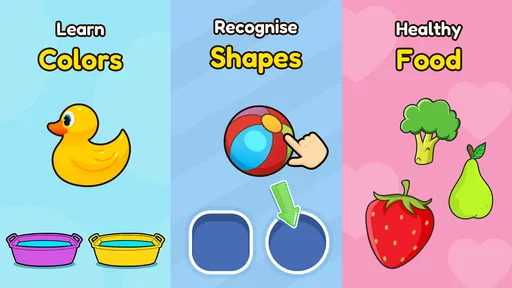
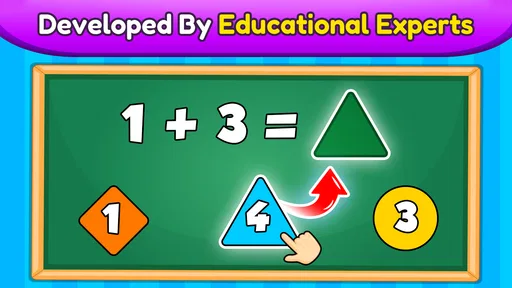
The app’s interface is bright and colorful, which is perfect for keeping the kiddos engaged. I mean, who doesn’t love a splash of color, right? It’s like their very own digital playground.
Features That Stand Out
Alright, let’s talk about what makes Bebi: Baby Games for 2-4y kids more than just another app on the market:
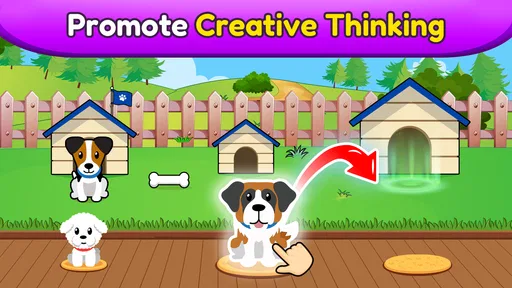
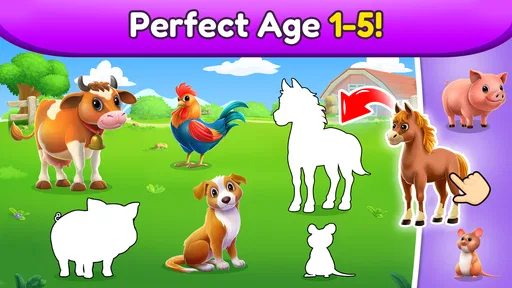
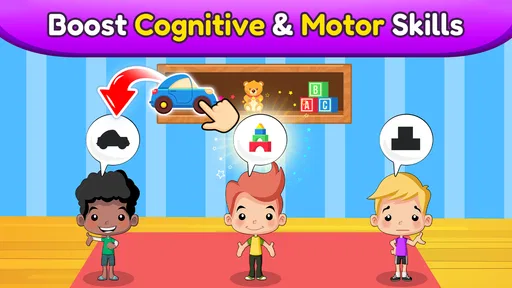
- Wide Range of Games: From puzzles to coloring activities, Bebi has got it all covered. These games are crafted to boost cognitive skills, hand-eye coordination, and creativity.
- Child-Friendly Interface: The app is super intuitive. Even if your kid is a tech newbie, they’ll figure it out in no time. The buttons are big and easy to tap, so there’s less chance of accidental exits or frustration.
- Offline Play: This is huge! You can download games and let your kids play without needing an internet connection. Perfect for road trips or when you’re in a spot with spotty Wi-Fi.
- No Ads: Yep, you heard it right. No annoying pop-ups or ads trying to sell your kid the next big toy.
Why Kids Love It
First off, Bebi speaks their language. The characters and animations are designed to be super relatable and fun. It’s like having a bunch of friendly digital pals who are always ready to play. Plus, the app gives them a sense of independence. They can choose what game to play, and that little bit of control is a big deal for tiny tots.
Another fantastic aspect is the rewards system. Kids love getting virtual stickers and stars for completing tasks. It’s a great motivator and adds a layer of excitement to their playtime.
From a Parent’s Perspective
Now, as a parent or caregiver, what do you get out of it? Peace of mind, for starters. Knowing that your child is engaged in educational content rather than mindless screen time is a huge relief. You can let your kiddo enjoy the app while you grab a cup of coffee, guilt-free.
The app’s design is also a win. It’s safe and secure, with parental controls in place, so you don’t have to worry about your little one stumbling upon something they shouldn’t.
The Final Verdict
So, is Bebi: Baby Games for 2-4y kids worth the download? If you’re looking for an app that’s going to keep your child entertained while also giving them a head start on some essential learning skills, then absolutely yes. It’s engaging, educational, and most importantly, it’s fun for the kids.
With its colorful design, variety of activities, and focus on learning, Bebi is definitely a resourceful tool for any parent or guardian. Plus, the absence of ads and the ability to play offline just sweetens the deal. So go ahead, give it a try, and watch your little one’s face light up with joy.
Happy parenting!
Pros
- Engaging educational content for kids.
- Simple interface
- easy for toddlers.
- Colorful graphics capture attention.
- Variety of mini-games keeps interest.
- No in-app purchases
- safe for kids.
Cons
- Limited content for older children.
- Requires internet for some features.
- Graphics may lag on older devices.
- Repetitive gameplay can bore quickly.
- Ads may interrupt game sessions.
FAQs for Bebi: Baby Games for 2-4y kids
What age group is Bebi: Baby Games for 2-4y kids suitable for?
Bebi: Baby Games is designed specifically for children aged 2 to 4 years. The app offers age-appropriate activities that focus on developing cognitive and motor skills through fun and interactive games. It's a great way to introduce your child to educational content in a playful environment.
Does Bebi: Baby Games require an internet connection to play?
Bebi: Baby Games does not require a constant internet connection for most of its activities, making it convenient for use in various settings, such as during travel. However, initial downloads and updates may require internet access. It’s advisable to update the app regularly for the latest features.
Are there any in-app purchases or ads in Bebi: Baby Games?
The app offers a free version with basic features and may include ads. However, to unlock additional content and remove advertisements, there is an option for in-app purchases. This ensures a seamless and distraction-free experience for your child while playing the games.
What kind of educational content does Bebi: Baby Games provide?
Bebi: Baby Games provides a range of educational activities that cover topics like colors, shapes, numbers, and animals. The app is designed to engage young children with interactive puzzles, matching games, and sound recognition exercises, all aimed at enhancing their early learning development.
Is Bebi: Baby Games user-friendly for toddlers to navigate?
Yes, Bebi: Baby Games features a simple and intuitive interface that is easy for toddlers to navigate. The controls are designed with young children in mind, allowing them to interact with the app independently. Bright colors and engaging animations further enhance the user experience.


